Equipment & Supply Management

Centralized oversight for collection assets and supplies.

Equipment and Supply Management is an independently installable Donor-ID module that helps blood centers track equipment, supplies, testing requirements, and asset status in one location.

Centralized recordsKeep equipment, supply, testing, and document information together.

Proactive visibilitySee past-due and upcoming testing requirements.

Collection-site connectionShare asset status with Quality Control at the drive.

Features

Know the status and history of every asset.

ESM provides configurable dashboard views, search filters, customizable test plans, and complete activity histories for equipment and supplies across the organization.

01

Manage assets

  • Track periodic QC, repair, and vendor qualification.
  • Upload documents related to an asset.
  • Maintain a complete audit trail for every asset.
02

Stay ahead of testing

  • Build customizable test plans by asset or category.
  • Identify past-due and impending tests.
  • Schedule inventory reports for individuals or groups.
03

Control supplies

  • Track supply lot numbers and expiration dates.
  • Use role-based access for system functions.
  • Apply multiple filters to configurable dashboard views.

Connected to the drive

Streamline on-site quality control.

Asset data from ESM supports the Quality Control process at the collection site. Drive QC data can return to ESM, reducing manual reporting when equipment fails.

Explore Quality Control
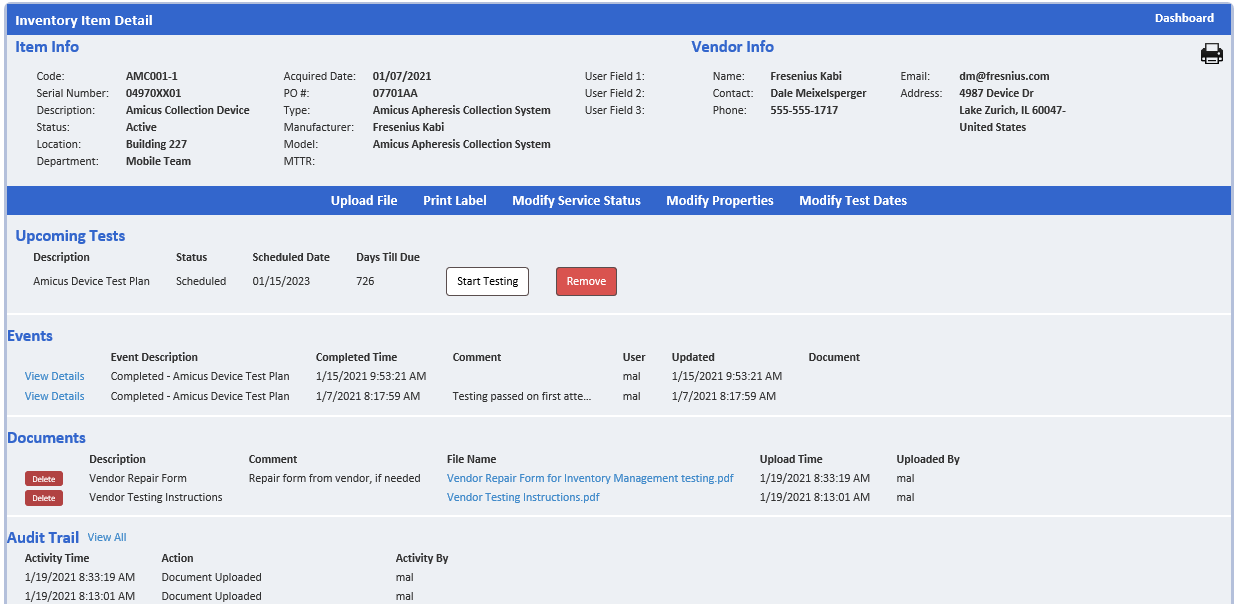
Equipment and Supply Management dashboard
Centralized equipment and supply information.

Work Orders

Move equipment issues from request to resolution.

Work Orders extends ESM with a clear, traceable repair and maintenance workflow that connects each request to the affected asset, the work performed, and the parts consumed.

01

Capture requests quickly

  • Submit repair and maintenance needs from within ESM.
  • Scan an asset QR code to begin with the right equipment record.
  • Turn a request into an actionable work order.
02

Keep work visible

  • Follow the current status of each work order.
  • Maintain a history of repair activity for the asset.
  • Keep maintenance work connected to the equipment record.
03

Control replacement parts

  • Record the parts needed to complete the work.
  • Keep replacement-part activity connected to the work order.
  • Update on-hand quantities automatically as parts are used.

Learn more

Bring equipment and supply information together.

Contact Healthcare-ID